Azure IoTEdge consist of two default in house agents and one or more custom modules. Those two default agents are edgeAgent and hubAgent. The custom module it self is upto the developer who builds it. Those agents and custom module must have log files some where. By default their logs files are on /var/lib/docker/containers folders. But to get access that folder you need to be SUPERUSER.
- On the prompt type : sudo su
- Then type cd /var/lib/docker/containers
- Then type ls -l to show all the contents inside that folder.
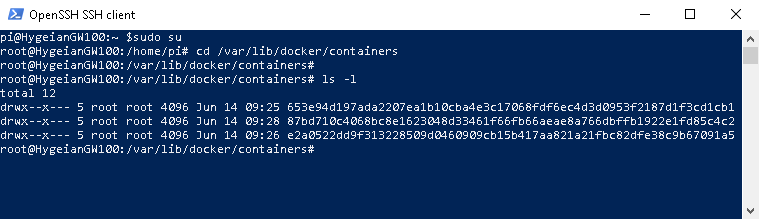
You would see folders that their names are in long random unique characters. Two of those are logging folder for our edgeAgent and hubAgent. The third one belongs to our custom module (in my scenario i only have 1 custom module).
Now, we need to go inside each folders one by one and remove the logs files.
- Type cd 653e94d197ada2207ea1b10cba4e3c17068fdf6ec4d3d0953f2187d1f3cd1cb1, in your case the name of the folder would be another long unique random characters.
- Once you are inside that folder, type ls -l on the prompt to view all the content under that folder.
- You would see many other folders and files, but just focus on the folder that has a name local-logs.

4. Now type cd local-logs followed by ls -l. You would see a file named as container.log.

5. Delete that container.log file type typing rm container.log on the prompt.
6. To take effect, you need to reboot the raspberry pi.

 John Hadikusumo